Passport & Visa Photo Maker
Create 300 DPI biometric photos. Smart crop & printable layout.
Upload Photo
JPG, PNG, HEIC. Make sure face is clear.
Photo Requirements Guide
1. Lighting and Exposure
Good lighting is critical. Shadows on the face or background are a common reason for rejection.
💡 Pro Tip: Natural Light
Stand facing a window during the day. This provides even, natural lighting without harsh shadows.
- Photo must be properly exposed (not too bright or too dark).
- Skin tones should look natural.
- Avoid red-eye from flash.
- No shadows behind the head or on the face.
2. Pose and Expression
Biometric software requires a specific neutral pose to identify facial features accurately.
- Face the camera directly (full face in view).
- Neutral facial expression (eyes open, mouth closed).
- Do not tilt your head.
- No smiling (for most countries, including US and UK).
3. Attire and Accessories
Wear normal street attire. Uniforms and camouflage clothing are generally prohibited.
- Wear clothing you normally wear on a daily basis.
- NO GLASSES: Eyeglasses are not allowed in US passport photos.
- No hats or head coverings (unless for religious/medical purposes).
- No headphones or wireless hands-free devices.
4. Background
The background requirements vary slightly by country but generally require a plain, light color.
- USA: Plain white or off-white.
- China: White or light blue.
- Schengen/EU: Light grey or white.
Our tool allows you to replace transparent backgrounds with the correct color automatically.
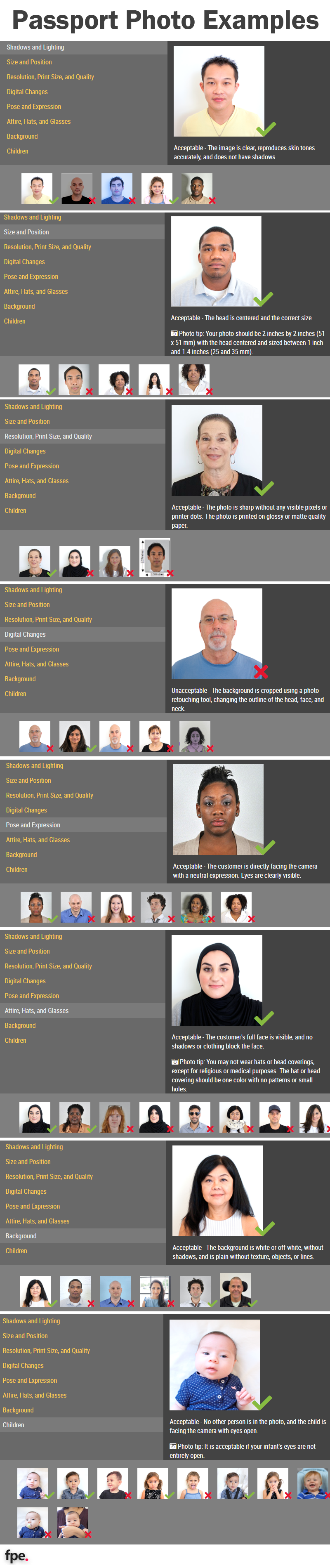
5. Passport Photo Examples
Here are some examples of the right passport photos.